Generate generic factories with Autofac

With Autofac, factory delegates can be generated based on delegate signatures. This article shows how this is done and also shows a solution to using generic delegates with Autofac.

One of the features I like the most in Autofac is the ability to register a factory in the container. A factory in this context is “some method that knows how to build and return an instance of some type”.

Factories are useful when you need fine-grained control over when dependencies should be resolved. Also, if you have dependencies that requires data input (e.g. a constructor parameter) and you need some way of passing that data into the dependency, a factory is your friend.

With Autofac it gets even better. Using C# I can declare a delegate that represents the signature of such a factory, register the delegate in my container and voila! Autofac generates the implementation based on the signature.

So I could declare a delegate like this:

public delegate ICustomerService CustomerServiceFactory();

and have it injected in, say, one of my controller classes, like this:

public class CustomerController
{
    private CustomerServiceFactory _customerServiceFactory;
    public CustomerController(CustomerServiceFactory customerServiceFactory)
    {
        _customerServiceFactory = customerServiceFactory;
    }
}

My controller now have the ability to decide when to create the service instance and still not need to know how.

To make the sample complete (thus far) I’ll show how the Autofac container setup looks like at this point:

var builder = new ContainerBuilder();
builder.Register<CustomerService>();
builder.RegisterGeneratedFactory<CustomerServiceFactory>();
builder.Register<CustomerController>();

This works great. And was fairly easy too don’t think? Now imagine that these classes and delegates was a small part of a real system, with hundreds of controllers and services. Having to declare a factory delegate for each service becomes a pain, let aside registering them in the container.

Wouldn’t it be nice if we could declare only one factory that could build all service types? Turns out you can. Think about the following generic delegate:

public delegate T ServiceFactory<T>() where T:class;

Our updated controller dependency now looks like this:

public class CustomerController
{
    private ServiceFactory<CustomerService> _customerServiceFactory;
    public CustomerController
        (ServiceFactory<CustomerService> customerServiceFactory)
    {
        _customerServiceFactory = customerServiceFactory;
    }
}

Registering such a delegate in the container becomes a bit tricky, since we don’t know T at registration time. Even more so, we cannot generate the factory delegate at registration time! The solution is to register the open generic type coupled with a method that will generate the factory when the dependency is asked for. The Autofac setup should now look like this:

var builder = new ContainerBuilder();
builder.Register<CustomerService>().As();
builder
  .RegisterGeneratedFactoryFromOpenType(typeof(ServiceFactory<>));
builder.Register<CustomerController>();

The RegisterGeneratedFactoryFromOpenType extension method does two things:

  1. Register the open generic type using builder.RegisterGeneric
  2. Attach factory generation code to the OnPreparing event.

The OnPreparing event will be fired when Autofac tries to resolve a closed version of the delegate, in our case the ServiceFactory delegate. Since the event argument contains this type we have everything necessary for generating the factory implementation. And here’s the implementation of RegisterGeneratedFactoryFromOpenType:

public static IGenericRegistrar
    RegisterGeneratedFactoryFromOpenType
    (this ContainerBuilder builder, Type openFactoryType)
{
    return builder.RegisterGeneric(openFactoryType)
        .OnPreparing(Prepare);
}

static void Prepare(object sender, PreparingEventArgs args)
{
    var factoryType = args.Component
        .Descriptor.BestKnownImplementationType;
    var serviceType = factoryType
        .GetMethod("Invoke").ReturnType; 

    var service = new TypedService(serviceType);
    var factory = new FactoryGenerator(factoryType, service); 

    args.Instance = factory
        .GenerateFactory(args.Context, args.Parameters);
}

Note: this code is based on the latest release of Autofac 1.

Share

Plugin mashup in FogBugz 7

With the advent of FogBugz 7 and the new plugin system, new possibilities arise for us FogBugz users.  Here is a tip on how to extend cases in this brilliant system with a custom field and add some functionality to it. Similar to the Related Cases feature, my scenario was that I wanted to connect cases to a wiki page with related information. My recipe is as follows:

Prerequisites

We need the Custom Field plugin by FogCreek and BugMonkey by Michael Pryor. If you’re a FogBugz on Demand user these are readily available in the Plugins admin panel.

Adding a custom field

Next, configure the Custom Field plugin and add a number field named “Wiki Page” with the description “Related wiki page”. Make a note of the description since it will come in handy later.

You will now have an extra field on each case called Wiki Page in which we expect users to enter the page id of a related wiki.

Making the field a link to the wiki page

Now go and configure the BugMonkey plugin. This plugin enables javascript to be executed on every page in your FogBugz installation. Luckily, the FogCreek team have already added JQuery into FogBugz mix so we can ride on that. Add the following script in the javascript text area:

var wikiPage = $(“.content[title=’Related wiki page’]”);
wikiPage.html(“<a href=”/?W + wikiPage.text() + “>Related wiki page</a>”);

The content of the wiki page field is rendered as a div element with class “content” and a title containing the field description. Thus, using JQuery to look up the element is a breeze.

After grabbing the element it is straightforward to add an anchor pointing to the wiki page url.

Conclusion

Ideally I would love to see the Custom Field plugin add the field name to the html element, perhaps as and id. Apart from that, with a plugin system and an eager developer community, systems like FogBugz can really reach new levels of extendability without having to put all possible features into the product up front.

Thumbs up for a great product, Fog Creek!

Share

Windows 7 and booting a virtual hard drive

Having isolated environments for doing development, testing or just trying out new stuff, is extremely valuable. I for one have several environments, one for each client I work for, and a couple for working with internal projects.

In the early stone age we had to make do with multiple computers to achieve such isolated environments. Then came the advent of emulators and virtual computers. For many years now we have had virtualization solutions that run virtualized computers, but with a performance cost in both resource consumption and processing speed. Mind you, the performance keeps improving with better hardware support.

With Windows 7 however, a hybrid solution is introduced. By virtualizing only the disk subsystem, Windows 7 is able to boot from a file system that is completely contained within a Virtual Hard Drive file, or VHD. The end result is that OS and applications execute on “the bare metal” while a thin virtualization layer redirects disk IO to the VHD file residing on the bare-metal disk.

Guest author Thomas Sandberg gives a quick rundown on how to set up booting from Virtual Hard Drives with Windows 7. Read the article here!

Share

Using screen scraping to expose legacy web pages in RSS

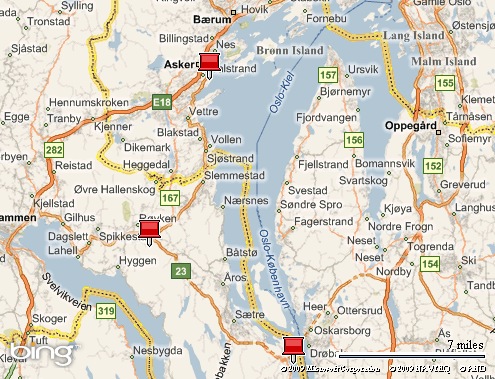
As part of my (almost) daily drive to and from one of my clients I pass through the sub-sea Oslofjord tunnel (Oslofjordtunnelen). Now what has driving got to do with screen scraping and RSS, you say?

Hang on, I’m getting there.

Below is a map extract that shows part of my route. The topmost pin is where I start out, the bottom-most pin is the Oslofjord tunnel. The pin in the middle is where, more often than not, a sign shows up stating that the tunnel is closed for maintenance.  You can imagine my frustration when I’m forced to drive all the way back north to get around the Oslofjord!

Map picture

To avoid that pain I set out to find a feed with traffic status updates and ended up at this page published by the Norwegian Public Roads Administration (NPRA). The page have regularly updated traffic information (all in Norwegian mind you) but to my frustration all as static web pages. No feed in sight!

At last here comes the screen scraping into play. You could write up your own scraper in any modern runtime these days. But being a good/lazy developer I know there are already quite good services out there that makes it a breeze setting up feeds with data scraped off of web pages. And lo and behold, I now burn a feed with the latest traffic updates!

So… basking in the glory of my genius for a couple of days I thought it a good idea to write up this blog post for the greater good of mankind. To make the story a bit shorter, what I discovered while rummaging around the NPRA site is that they indeed have great support for RSS!

Feeling a bit stupid I will now go and redirect my FeedBurner setup…and please let me know if there is a moral to this story.

Good night.

Share

Going to Microsoft PDC 2009!

Only one year after the most successful PDC 08, I find myself (and my company) going to Los Angeles once more. PDC 09 looks promising with sessions covering the .Net Framework 4, Visual Studio and Team System 2010, Windows Azure, DirectX 11, Silverlight 3, and much more.

Share